
Introduction
This weeks task is to make a Bone rigging Animation with Photoshop and Unity. We were given a BlueNinja Character to download and use for this task only, we will be making and rigging bones for each part of the BlueNinja and make 4 Animations with it. (Idle, Walk, Run and Jump)
This was all made in Adobe Photoshop 2023 and Unity.
Task
The task is to give the Character Bone and Geometry structure ready for Animation. Then we needed to make 4 different Animation for the Character to perform. The 4 Animations are Idle, Walk, Run and Jump.
Bone Rigging
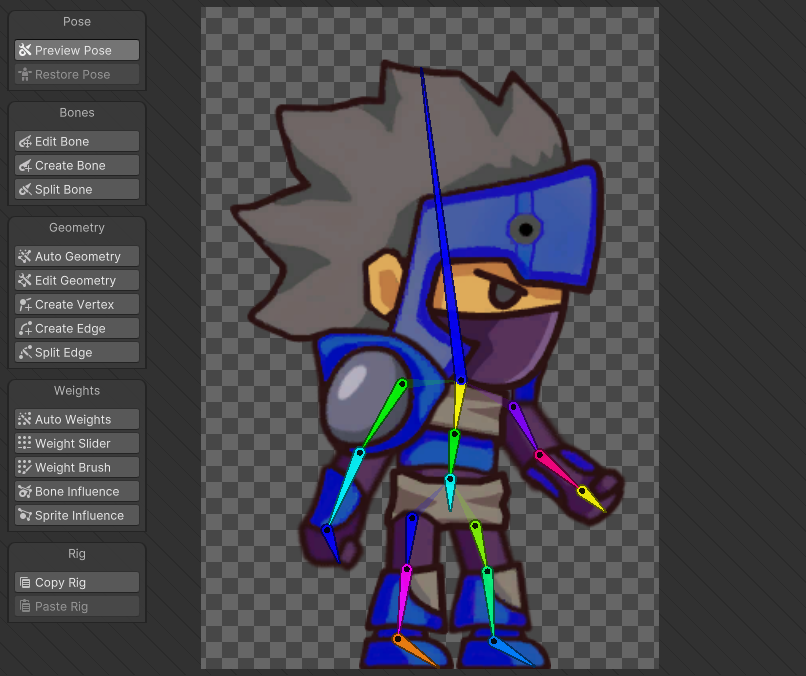
In Unity, I needed to create bones for each parts of the Character, Each get their ‘Bone line’, this signs the body parts to them. there will be ‘bone splitting or connector’ so that the Arms and Legs aren’t fully attached to the middle of the Body and Torso.
Geometry Border / Sprite Influencing
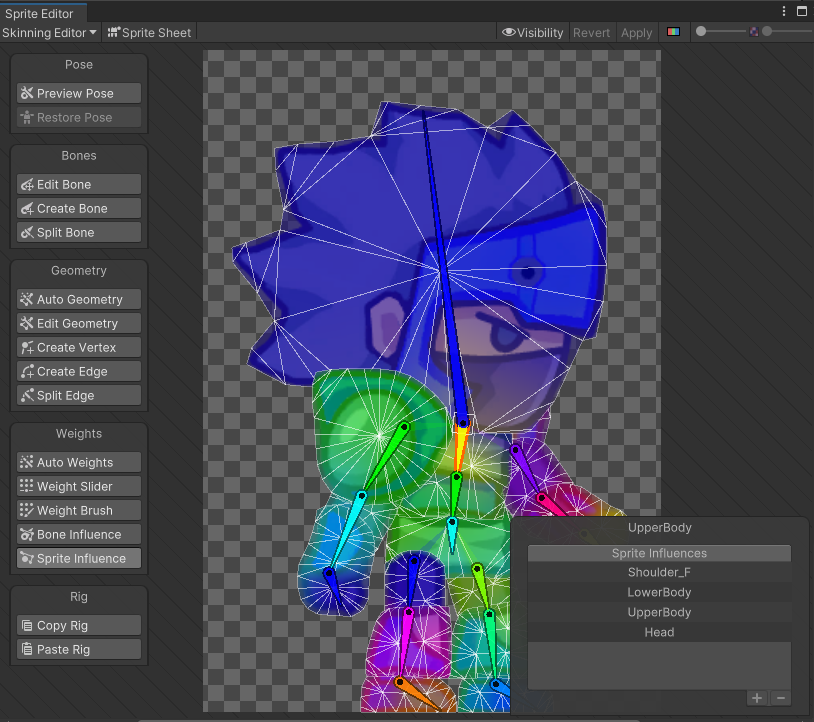
Now that I added in the bones, now I need to add the Geometry border to see that the parts are aligned properly and making sure that the border isn’t too small or big for the Character.
Now the Characters parts need to be fully connect to the right parts and remove the ones that shouldn’t connect to them.
Animation – Idle
The First Animation built is a simple Idle Animation for when the Character is not moving. The character will move up and down in place and the head will sway slowly. The Character will go into this Animation and wait the Player to move the Character into either direction. This was made with Three Animated events.
Animation – Walk
The Second Animation made is the Walk Animation, this plays when the Player makes the character move in any direction and not standing still. The character will move their Legs and the Arms will follow opposite with the Legs. The Head will move a little too. This was made with Six Animated Events.
Animation – Run
The Third Animation created is the Run Animation, this performs when the Character is moving in any direction whilst the Player is holding down the ‘Run button’. Both Arms and Legs move more rapidly then the Walk Animation and the Head moves quicker too. This was made with Eight Animated Events
Animation – Jump
The Last Animation Created is the Jump Animation, this is performed when the Player presses the ‘Jump button’ and the Character will begin to jump into the air and land back down.
All Parts of the body move in this one, bending and stretch of the Knees and Legs, bending and reach of the Elbows and Arms, Movement of the Pelvis and Curling of the Head. This was made with Twelve Animated Events.
What was Challenging to me?
Getting used to setting up frame by frame each change to BlueNinja’s body parts. It was tedious ay first but slowly gained understanding on how it works and learning how I could mess around with it.
What Have I Learned?
I have learned how to give a Character bones to move each of the body parts for Animation, learned how to edit the bones and how disconnect the link to unnecessary parts. I have also learned the basics of animation, going frame by frame and the body change poses to make actions like Walking, Running, Jumping and more.