
Brief
For this Week I have been Tasked with getting into a Group with People and Playtesting with 4 Different Emerging Technology Software. We spend a Maximum 1 Hour on each Software to get a Taste of what each of the Softwares offer. This includes Mechanics, Appearance, Tools, Tutorials, User Experience, etc.
Week 4 – Oculus Software Playtest (VR, AR, MR, XR)
Me and the Team took turns Trying Each of the Softwares, Giving 10-15 Mins per Person so then Everyone gets to Playtest within the Time Limit. We made sure to Record and Screenshot, some of our Playtests in Each of the Four Softwares.
What is VR?
VR stands for Virtual Reality. VR Creates a fully Immersive Environment for the User. They can interact with Realistic Objects and Avatars. This has been used for Teaching Students education.
Advantages:
- Immersive Learning – Provides a Immersive, Realistic Experience. Allows users to interact with the environment and objects like they are Real.
- Repeatable Scenarios – VR Apps and Games will allow Users to repeat stages. This way, they can sharpen their Skills and help build Muscle Memory.
Disadvantages:
- Motion Sickness – Some people can get Motion Sickness (Nausea and Dizziness) or Discomfort because of the Sensory Disconnection between Virtual and Real Physical Movements.
- Cost and Accessibility – VR Devices are expensive and repairing them can be costly.
VR Example:
VR Surgeon Simulator is an example of a Virtual Reality Experience. Allowing Users to be a Surgeon and perform different types of Surgery on a man called ‘Bob’. The Tools having Real life Physics and Uses for an Immersive Experience.
What is MR?
MR stands for Mixed Reality. MR Uses a combination of VR and AR together. Having a Physical and Digital worlds together and interact in real time.
Advantages:
- Enhanced Interaction – User can Make and interact with Digital Assets inside of a Real World Environment.
- Real-Time Collaboration – MR shares the Digital Space with anyone who has access. This workspace can be accessed from anywhere.
Disadvantages:
- Technical limitations – MR is still a new piece of technology, so there will be some physical limitations, like Field of View and the Processor’s Power to keep up with the demand.
- Discomfort – Wearing a Headset for long periods of time can lead to Tiredness, Nausea and Discomfort. This can be potentially affect to your Health.
MR Example:
Miracle Pool uses MR to project a Pool Table, Cues, Cue Balls, Avatars and Trophy into a Real World Setting. Multiple people with headsets can be in the Same Room and play some Pool Together.
What is XR?
XR stands for Extended Reality. XR uses the vast range of Reality Types. XR Uses VR, AR and MR.
Advantages:
- Improved Learning – XR has been used to help give Students improved learning by allowing them to interact with the Lessons, which helps learning.
- Accessibility – XR tends to be more accessible to the Public. Allowing Students to have a new experience and being less expensive and difficult to access.
- Enhanced Collaboration – Multiple people can collaborate in the same Virtual Workspace. This also allows people from around the world to connect to the Work Space, no matter where their location.
Disadvantages:
- Health Risks – XR has the same problem with User can Experience Headaches, Eyestrain, Dizziness, Tiredness and Disorientation.
- Privacy and Security – XR’s Data is based in XR’s Computer network. That means Higher chances of getting Hacked and Cyber-Attacked.
- Safety – Users need to be careful where they plan to use XR.
XR Example:
FitXR uses different ranges of Virtual Types. Using VR for the world but also allowing other people to join in and watch the Fitness. Other people can also see who is playing the fitness too, whilst the others are mostly invisible and can’t move.
Adobe Aero (AR)
The First Software we Started with is from Adobe Inc, Adobe Aero. This Software is about Creating, Placing Assets into a Real Environment through using a Devices Camera (Phone, Tablet, etc).
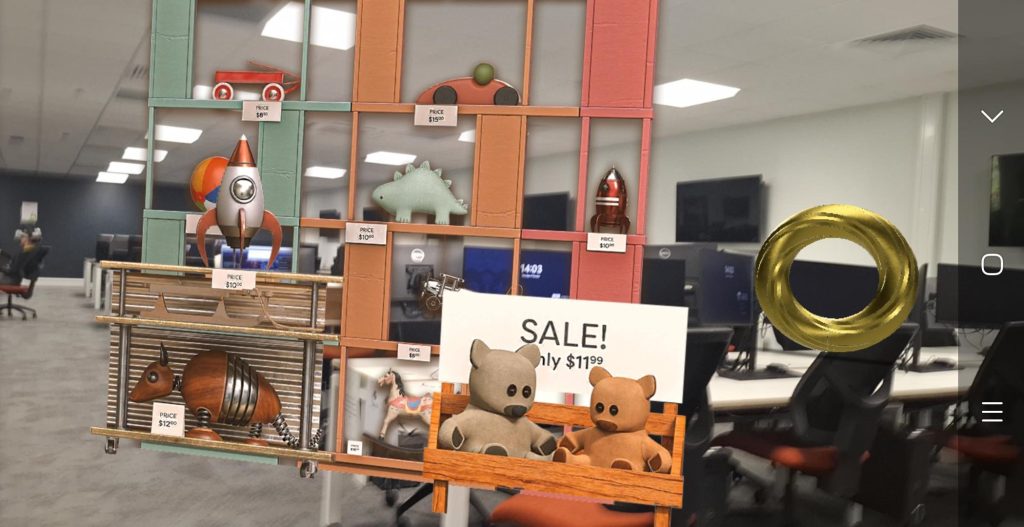
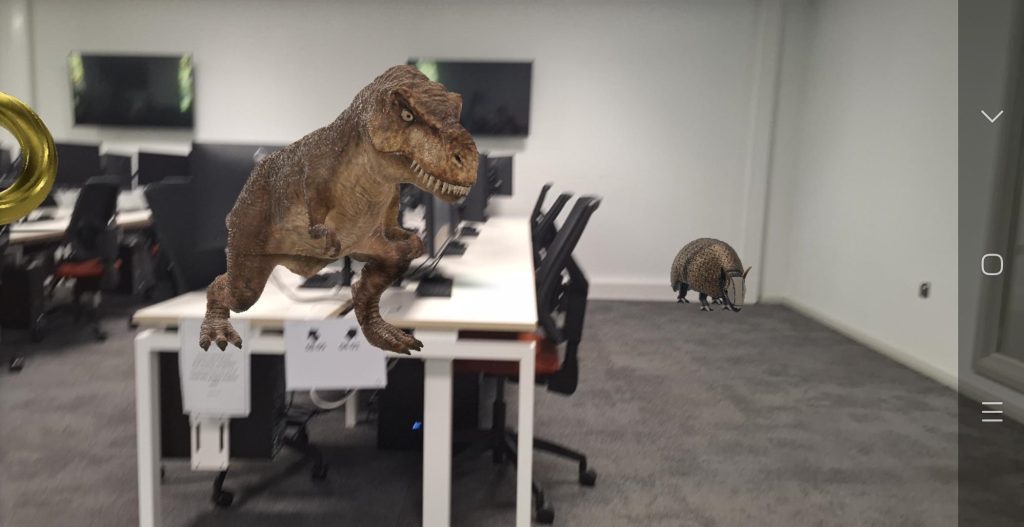
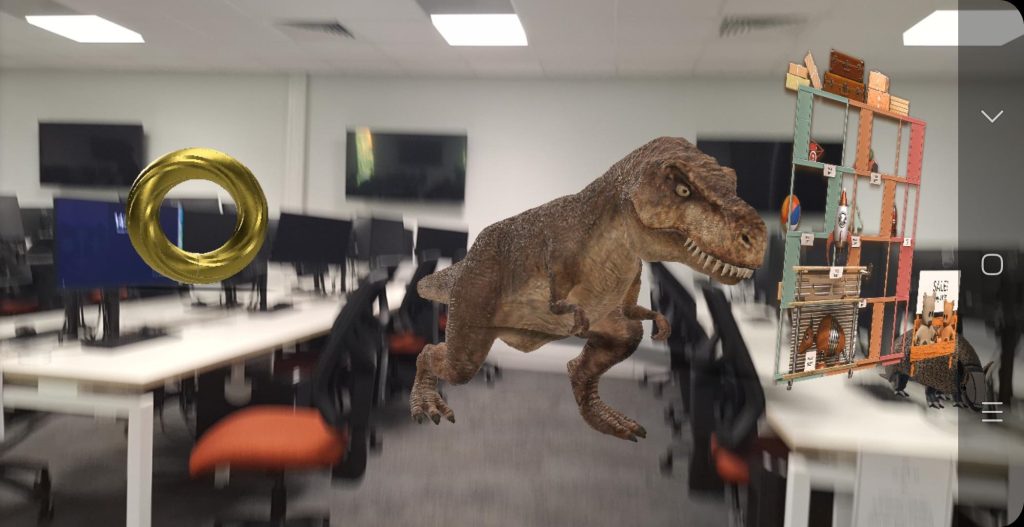
This App is Great for people who want to Create Furniture and want to know what It could look like in a real Environment by placing the Assets into Adobe Aero’s Camera AR Function.
Also can be good as a Digital Portfolio Gallery for showing off 3D Assets someone Created, so People can come look at what they have created over the course of their Education Years.
Do I plan to use this Software again for my Final Project?
Despite how cool it looks to bring Digital Assets into the Real World axis, this is not the Route I want to go with for my Final Project. My idea for my project is having my own custom environment to work with. But if I did:
Advantages:
- Love to see my Assets up close in real scale
- Got a Basic understanding of the Software
- Can make my own Digital Gallery of my Assets
Disadvantages:
- Better on a Tablet, I don’t own one…
- Don’t have that many Assets I could show off
- Still need more practice with the software
Gravity Sketch (VR & MR)
The Next Software we used is called Gravity Sketch. This App takes more of a flexible and Artistic Approach. Using Brushes to create Anything the User deems to Make. You can move the Brush Strokes, Paint them In, etc.
This is my Playtest of Gravity Sketch, I used the Default Brush and I just doodled until the shapes gave me an Idea. I decided to make a quick Long-Tailed Dragon, with a long body, arms with claws and whiskers, having the same shape as Sun Rays.
Do I plan to use this Software again for my Final Project?
Gravity Sketch is going in the General Direction of what I want for my Final Project, Customisation. But its still doesn’t quite hit the dot for what I want, Something is still missing for me. But if I did:
Advantages:
- I can get quite Artistic with all the Brushes and Settings
- Can make some quick sketches inside the software
Disadvantages:
- Can limit me with little edit control on the Meshes
ShapesXR (XR)
This next Software is ShapesXR. This Software is Similar to Gravity Sketch but offers some new Tools.
Another cool Mechanic is this can be a Shared Project. Whilst I am in VR, creating My Assets. My Team could be adding their Stuff on the Computer.
In my Playtest in ShapesXR, I Created a Quick Low Poly Stone Statue that could be slightly mistaken for a Snowman. I gave my Statue a Full Body, Eyes, Mouth, Hair and Top Hat. I was quite immersed into the Playtest.
Do I plan to use this Software again for my Final Project?
Same goes here, being able to be more Artistic and making Environments is the direction I want to go. but I might not go with ShapesXR because of the lack of Editing on the Model, you can move it around but that’s it. But if I did:
Advantages:
- Different Brush Types, ranging from High Poly, Low Poly and Material Brushes
- Can made some Big Projects like full on Skyscrapers and Streets
- Shrink down my size to walk through Big Scenes
Disadvantages:
- Limited Editing on Models will put me off
Open Brush (VR)
The Last Software to be Play tested was Open Brush. Out of all the Softwares in my Opinion, I think Open Brush is the most artistic out of all of them. Having so many Brushes, effects and Designs to work with.
Since we ran low on time due to unseen circumstances, Only Two out of the Four Members could give it a Playtest. So when they finished their Recordings, they allowed us to have their Videos of the Playtest.
Do I plan to use this Software again for my Final Project?
Out of all Softwares on this Blog, Open Brush has the best chance for me to take forward for my Final Project. I love how artistic Open Brush presents itself, you make some beautiful Art with the many Brushes it has to offer. If I did:
Advantages:
- I can some Beautiful Environments with the Many brushes it from Oil Brush to Effects Brushes, like Snow, Sun Rays, Sparkles, Rainbow, etc.
- Got the Basic Controls down from Play testing at Home.
- Some many different vibrant Colours and Highlights to play with.
- Easy to Import my own Images, Videos and Assets
Disadvantages:
- I could spend too much time, messing around with the Tools
Which Software will I consider Using more?
In this Blog, Open Brush Takes the Crown of the Software I would personally take Forward as a Candidate for my Final Project. Now I have to eventually Decide to choose between Autodesk Maya to make a Anime 360 Video or Open Brush to make a Artistic Anime Environment.
Concepts/Ideas
For AR, I could make a Digital Gallery of some of my Assets I made through my Education years. Using a Big Empty Room to place all my Assets and have text to explain how I made my Assets and what Inspired me to make them.
With any of the Oculus Brush Softwares. I would create a Multi-world Project, a little like Super Mario’s World Selection and you get a Mini World as a visual. Shows off some Artistic Themed Worlds.
References
Cheru (2021) VR Brain Surgery Simulator. YouTube. Available online: https://www.youtube.com/watch?v=JbPbmtzb-Ao [Accessed 22 Oct. 2024].
Meta Quest (2020) FitXR | Oculus Quest Platform. YouTube. Available online: https://www.youtube.com/watch?v=6dnq6CzahSs [Accessed 23 Oct. 2024].
Meta Quest (2024) Miracle Pool | Official Trailer | Meta Quest Platform. YouTube. Available online: https://www.youtube.com/watch?v=SWxSbJ_NGcs [Accessed 23 Oct. 2024].